As the manufacturing industry moves toward greater flexibility and customization, frequent switching between different products on the same production line has become the norm. Take the 3C electronics and automotive parts industries as examples: an automated screw-fastening production line may need to produce 3–5 different product models daily, each with distinct screw specifications, fastening locations, and torque parameters.
The efficiency of changeovers directly determines a production line’s effective operating time. Traditional changeover methods rely on engineers adjusting programs on-site, swapping tooling, and conducting repeated test fastening cycles; a single changeover can take anywhere from 30 minutes to 2 hours, resulting in staggering cumulative downtime losses during frequent changeovers. More seriously, issues such as incorrect parameter settings or forgotten tooling changes during the changeover process are often not discovered until mass production begins, leading to rework or even scrap.
This article shares a production-line-validated methodology for rapid changeover across three dimensions—program architecture design, changeover workflow, and time-reduction strategies—to help enterprises significantly improve the efficiency and reliability of mixed-product production lines without requiring additional hardware investment.
I. Principles of Modular Program Design
1. Modular Program Architecture: Main Program + Subprograms
The fastening program is divided into a two-tier structure consisting of a “main program” and “subprograms.” The main program handles overall process control (start, reset, loop, and end), while the subprograms handle specific fastening actions (move to position, descend, tighten, and lift). Each product corresponds to a set of subprograms, and the main program achieves product switching by calling different sets of subprograms.
The core advantage of this architecture is that the main program logic is written once; subsequently, adapting to new products requires only adding or removing subprograms, thereby avoiding the repetitive effort of “rewriting the main program for every new product.” At the same time, the subprograms are independent of one another, so parameter adjustments for a specific product do not affect the operational logic of other products.
2. Tiered Parameter Management: Global, Product, and Workstation Levels
Screwdriving involves numerous parameters; if they are scattered throughout the program, locating and modifying them during changeovers is highly prone to errors. It is recommended to organize parameters into three management tiers:
• Global Parameters: General equipment settings, such as safety height, maximum speed, and communication ports, which are shared by all products and do not require modification during changeovers.
• Product Parameters: Settings specific to a particular product, such as screw specifications (M2/M3/M4), target torque, tightening angle, and insertion speed. Each product corresponds to a separate parameter file (e.g., in JSON or CSV format); during changeovers, simply load the corresponding file.
• Workstation Parameters: Fine-tuning values specific to a particular workstation, such as bit compensation offset, vision calibration deviation, and Z-axis pressing depth. The same product may require fine adjustments at different workstations due to mechanical assembly tolerances; these parameters are placed at the workstation level and do not affect the consistency of product-level parameters.
3. Template Reuse and Inheritance Mechanism
For products with similar screw specifications and fastening processes (such as different variants within the same product series), the “template inheritance” mechanism can reduce repetitive configuration. First, create a base template containing the common fastening process and default parameters; new products inherit from this template and only need to override the differing parts (such as torque values and point coordinates).
The inheritance mechanism not only reduces the workload of parameter configuration but, more importantly, establishes relationships between parameters. When common parameters in the base template require global adjustments (such as a uniform increase in safety height), all products inheriting from that template are automatically updated, eliminating the risk of omissions that can occur when modifying each product manually.
II. Key Steps for Quick Changeovers
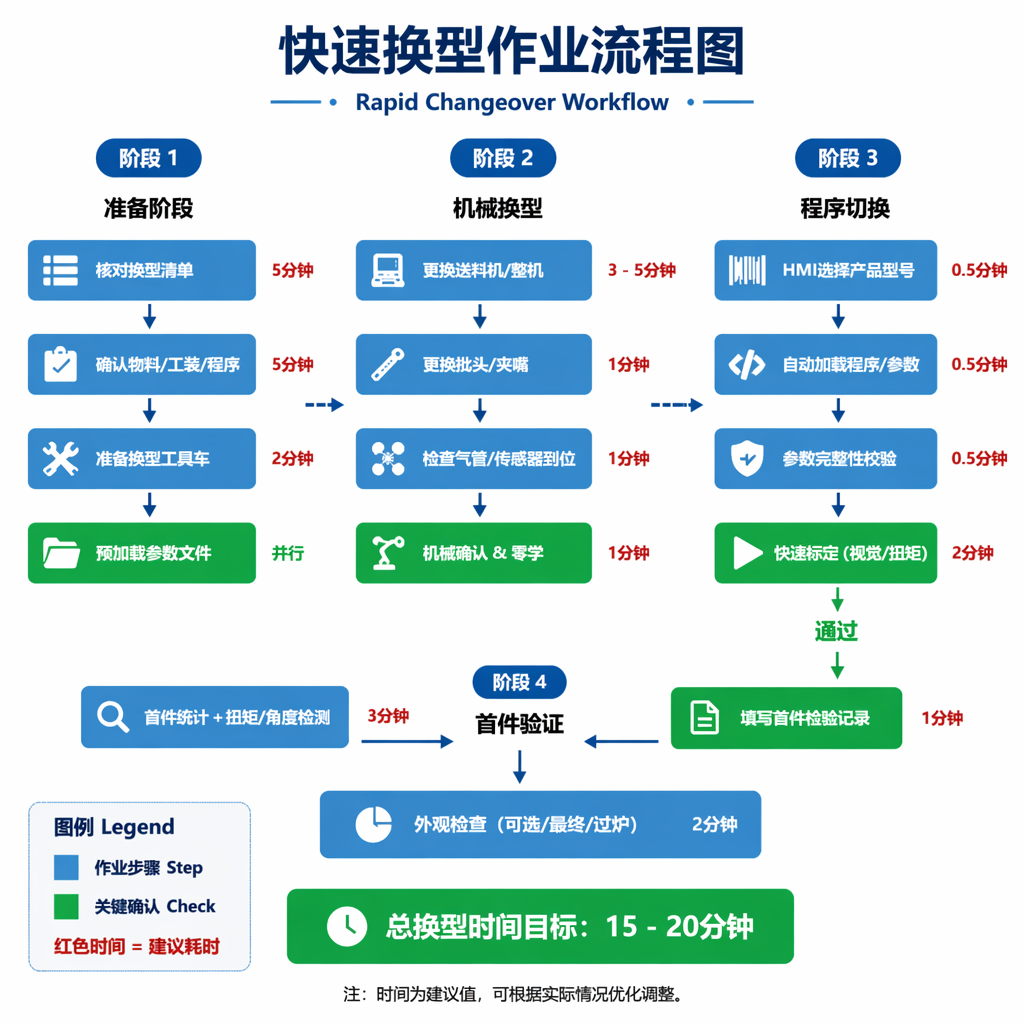
1. Pre-Changeover Preparation: Material and Tooling Verification Checklist
Preparations made before a changeover determine how smoothly the process will proceed. It is recommended to create a standardized “Changeover Preparation Checklist” for each product, which should include: confirmation of screw specifications and quantities; inspection of screwdriver bit models and wear conditions; verification of nail feeder models and air hose/signal cable connections; matching of clamp jaw models; matching of jig/fixture models; and confirmation of program file names and version numbers.
The checklist should be reviewed item by item and checked off by the operator before the changeover begins, then verified and signed by the shift supervisor. This seemingly tedious step actually transforms “changeovers based on experience” into “changeovers based on standards,” significantly reducing changeover failures caused by improper preparation of materials or tooling.
2. Mechanical Changeover: Replacement of the Nail Feeder, Screwdriver Bits, Clamping Jaws, and Fixtures
Mechanical changeover is the most time-consuming part of the process, involving the physical replacement of the entire nail feeder, screwdriver bits, clamping jaws, and fixtures. The core strategy for reducing mechanical changeover time is “standardized interfaces + quick-change structures.”
Specific measures include: adopting a quick-change design for the entire nail feeder unit, standardizing baseplate mounting dimensions and quick-connect interfaces for air hoses and signal cables, and limiting the changeover time for a single unit to 3–5 minutes; matching jaws to different inner diameters based on screw specifications (M2/M3/M4, etc.) using threaded or snap-fit quick-change mechanisms; using magnetic or snap-fit quick-change chucks for screwdriver bits, allowing tool-free replacement; fixtures and clamps employ a positioning pin plus locking handle structure to ensure repeatable positioning accuracy while reducing clamping time.
Additionally, it is recommended to equip each product with a dedicated “changeover cart,” pre-loading all components requiring replacement (the entire screw feeder, screwdriver bits, clamping jaws, fixtures, and spare screws) onto the cart. During changeovers, the cart is rolled directly to the equipment in one go, minimizing time wasted on back-and-forth trips to retrieve materials.
3. Program Switching: Template Retrieval and Parameter Loading
Program switching is the stage most prone to errors during changeovers. The traditional method involves copying programs via a USB drive or manually modifying parameters one by one, which is both time-consuming and error-prone. Under a template-based design, program switching should be achieved with a “one-click retrieval.”
When an operator enters the product model (or scans the product barcode) on the HMI interface, the system automatically retrieves the corresponding main program, set of subprograms, and three-level parameter files from the program library to complete the program loading. The entire switching process should be completed within 30 seconds, and the system automatically verifies the completeness of the loaded parameters; if any critical parameters are missing or out of range, an alarm is triggered immediately.
4. First-Piece Verification: Comprehensive Confirmation of Torque, Angle, and Position
After the program changeover is complete, first-piece verification must be performed; mass production may only begin after confirming that the fastening quality meets specifications. First-piece verification should include: checking whether the torque value is within the set range, whether the tightening angle curve is normal, whether the fastening position is offset, and inspecting for visual defects such as screws sitting too high, stripped threads, or over-tightening.
First-piece verification must be performed independently by quality personnel, who must complete the first-piece inspection record form. If verification fails, a retrospective check must be conducted to verify whether the mechanical changeover was completed, the parameters were loaded correctly, and the program waypoints are misaligned; after resolving the issues, verification must be repeated. It is strictly prohibited to proceed directly to mass production without first-piece verification.
III. Practical Methods for Reducing Changeover Time
1. Parallel Operations: Synchronizing Mechanical Changeover with Program Preparation
Traditional changeover follows a sequential process: First, change the mechanical components; then adjust the program; and finally, verify. In reality, program preparation tasks (verifying parameter files and preloading programs) can be performed entirely in parallel with mechanical changeover.
Specific procedure: While the previous product is still in production, process engineers have already verified the parameter files for the next product in the background and preloaded them into the controller’s cache; once the mechanical changeover is complete, the operator simply needs to confirm “Switch” on the HMI, and the program takes effect immediately. Through parallel processing, program changeover time can be reduced from 10–15 minutes to less than 1 minute.
2. Pre-configured Program Library: Storing Programs for Frequently Produced Products
For products manufactured frequently on the production line (such as SKUs accounting for the top 80% of monthly output), their complete program packages (main program + subprograms + parameter files) should be permanently stored in the controller’s local memory, eliminating the need to import them from an external source during each changeover.
Another benefit of the pre-set program library is version control. All pre-set programs are centrally managed by the process department; once validated, their version numbers are locked. On-site operators can only access these programs but cannot modify them, fundamentally eliminating quality fluctuations caused by arbitrary parameter changes on the shop floor.
3. Quick Calibration Tool: Automatic Calibration of Vision and Torque
After a product changeover, the coordinate reference of the vision system and the zero point of the torque sensor may need to be recalibrated. Traditional manual calibration is time-consuming (approximately 10–15 minutes for vision calibration and 5 minutes for torque calibration) and relies on operator experience.
With the introduction of the Quick Calibration Tool, the vision system can automatically complete coordinate system calibration within 30 seconds by recognizing feature points on a standard calibration plate; the torque sensor can complete multi-point calibration within 1 minute via its built-in standard torque wrench interface. Quick calibration not only saves time but, more importantly, eliminates human calibration errors and improves the consistency of the first part produced after a product changeover.
IV. Common Changeover Errors and Preventive Measures
1. Incorrect Program Selection or Version Mismatch
In a multi-product program library, file names are often similar, making it easy for operators to select the wrong one (e.g., mistakenly selecting “Product-A-V1” instead of “Product-A-V2”). Preventive measures: Use a standardized naming convention for program files—“Product Model_Version Number_Date”; display product image previews on the HMI interface; and require a mandatory double confirmation before changeover.
2. Parameters Not Updated or Incomplete Overrides
Under the inheritance mechanism, if updates to the base template are not promptly synchronized to child templates, or if certain fields are missing when parameter files are loaded, the actual operating parameters may differ from expectations. Preventive Measures: Establish a parameter file validation mechanism to automatically check field completeness during loading; mandate full-scale testing and verification after every template update.
3. Failure to Replace or Improper Installation of Tooling
During changeovers, operators may forget to replace the bit, fail to properly connect the nail feeder’s air hose, mix up clamp jaw models, or fail to fully insert the positioning pins on fixtures. Preventive Measures: Install position sensors at critical tooling locations; the equipment should not start if components are not properly installed. Use different colors to mark the air hose connectors on the nail feeder to prevent incorrect air source connections. Include a separate “Mechanical Verification” check item in the changeover checklist to verify the nail feeder, screwdriver bits, clamping jaws, and fixtures one by one.
FAQ
Q1: Is it realistic to reduce changeover time from 2 hours to 15 minutes?
It is entirely feasible, but requires systematic restructuring. A 2-hour changeover typically results from “adjusting on the fly”—discovering program errors only after mechanical setup is complete, or realizing parameters need adjustment after the program has been loaded. Through templated design, a pre-set program library, and parallel operations, “debugging time” is moved to the pre-changeover phase. On the shop floor, only standardized actions need to be performed; 15 minutes is a target time verified on the production line.
Q2: Will program templating limit process flexibility?
No. Templating designs the “structure,” not the “content.” The base template defines the framework of the fastening process (move → descend → tighten → rise), but the specific parameters for each step (speed, torque, angle) can be freely configured in product-level parameter files. For new products, simply create a new parameter file—there’s no need to modify the program structure, so flexibility is actually higher.
Q3: What are the common causes for the first-piece verification failing after a changeover?
The most common cause is incomplete mechanical changeover: the bit not fully inserted into the fastening shaft; a mismatch between the screw feeder’s chuck model and the screw, causing jamming; incorrect air hose connections leading to abnormal air pressure; or wear on the fixture’s positioning pins causing product misalignment. The second most common cause is parameter issues: incorrect loading of torque target values or failure to update the vision calibration reference. We recommend creating a quick troubleshooting checklist for first-piece failures and systematically ruling out issues in the order of “mechanical → electrical → program.”
Q4: How much storage space is required for the preset program library?
A single program package (main program + subprograms + parameter files) typically does not exceed 1 MB. Taking 100 product types as an example, the total capacity of the preset program library is approximately 100 MB, which can be easily accommodated by the storage capacity of modern PLCs or industrial PCs. It is recommended to periodically purge old program versions that have not been used for a long time to keep the program library streamlined.
Q5: How can the effectiveness of changes in changeover efficiency be evaluated?
The core metrics are “changeover time” and “first-pass changeover yield.” Changeover time is measured from the start of the changeover until the first-piece verification is passed; first-pass changeover yield refers to the percentage of changeovers that pass the first-piece verification on the first attempt. We recommend tracking the trends of these two metrics monthly to identify bottlenecks and continuously optimize the process. Additionally, you can calculate the “changeover loss ratio” (total changeover time / scheduled production time), with a target of keeping it within 5%.
— End of Article —
Author: Chisu Automation Technical Department
Publication Date: August 2026
Keywords: mixed-product production lines, rapid changeover, program templating, automated screw fastening, flexible production, changeover efficiency